TinyWL’s Frame
一直想学习 wlroots 项目中的 scene 抽象,于是先从 output 的 frame 回调开始。 内容基于 0.19.0 版本的 wlroots 源码。
Request a notification when it is a good time to start drawing a new frame, by creating a frame callback…
协议 wl_surface:request:frame 确保客户端绘制与显示器同步。
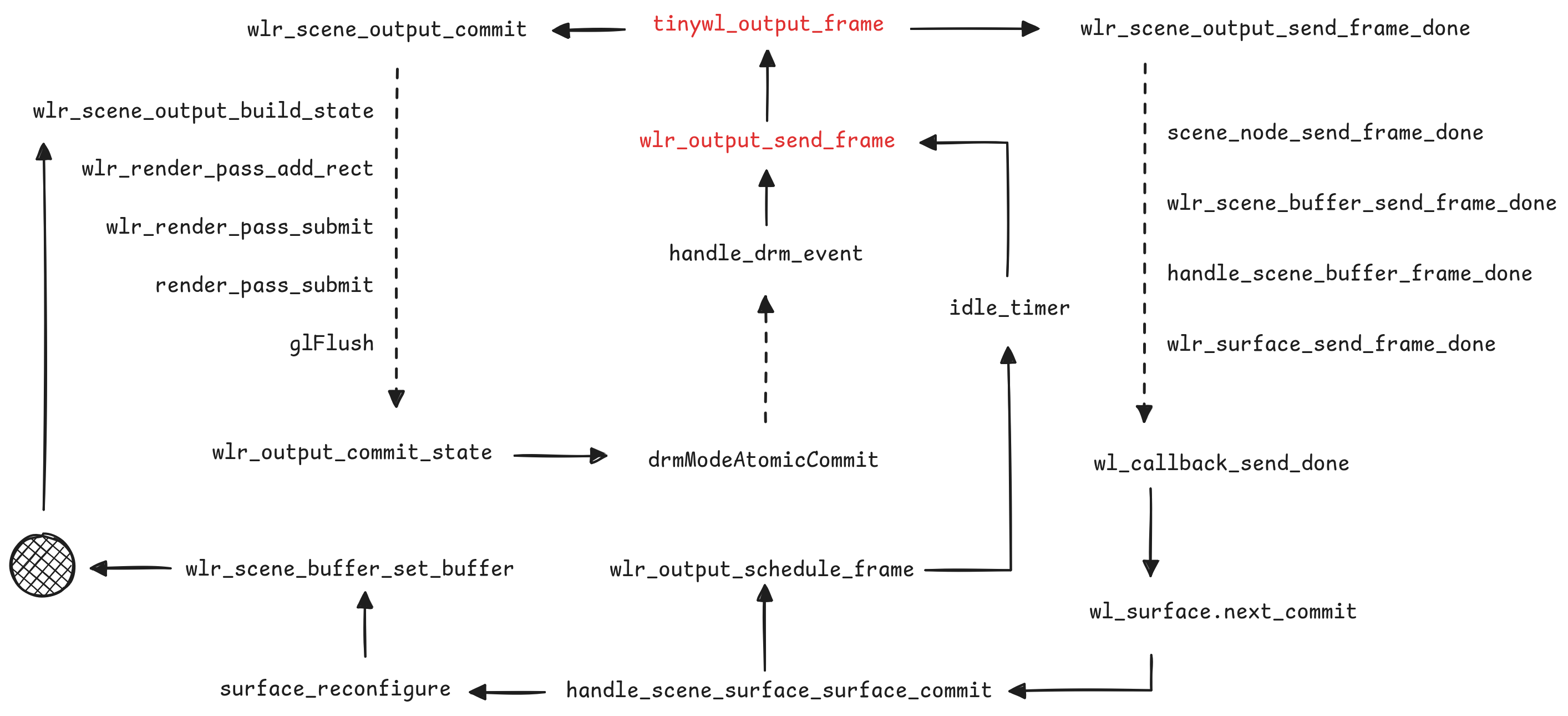
Tinywl 中 output_frame 函数绑定在 wlr_output 的 frame 信号上,
触发主要与后端有关,受到显示器的 page-flip 等帧率限制。
在合适的时间,合成器主动触发请求 frame 中的 wl_callback 回调 done,
提醒客户端可以准备下一帧。
The frame request will take effect on the next
wl_surface.commit.The
callback_datapassed in the callback is the current time…
发送一个不知何时开始的毫秒时间给客户端,想不出来除了时间还有什么其他影响。
在函数回复 done 之前的 wlr_scene_output_commit 在处理当前帧的数据状态,
wlr_output_commit_state 函数是我们在初始化 wlr_output 的 mode 时见过的老朋友。
经过接口 wlr_output_impl 和 wlr_drm_interface 的分发,
现代硬件很有可能走到了 drmModeAtomicCommit 的底层调用,
这个函数从内核绕了一圈,又会触发后端的 drm_event 产生一次 frame 事件。
TinyWL 对 wl_surface:request:commit 的监听约等于空,
可以认为是 scene 也监听了这个信号并在背后自动完成相关工作,
如函数 handle_scene_surface_surface_commit。
wlr_output_schedule_frame 和 wlr_output_send_frame 关系紧密,
一个偏业务另一个偏资源。大部分情况下应用窗口随显示器刷新不断收发:
- surface.commit
- request frame
- waiting about 1/60s
- callback.done
- surface.commit
但是应用窗口的 commit 可能不会触发 backend 的实际 commit 造成没有 frame 回调, 因此加入 schedule 以期在闲置时为应用程序有序刷新出 done。
对于 Scene 场景累积状态,以 wlr_scene_node_set_position 函数为例流程如下,
核心逻辑包含在 scene_node_bounds 和 scene_update_region 中:
步骤 1: 更新节点位置 wlr_scene_node_set_position
  node->x = 100
  node->y = 200
  ↓
步骤 2: 调用 scene_node_update
  ↓
步骤 3: 计算全局坐标 wlr_scene_node_coords
  x = 100, y = 200 (假设无父节点)
  ↓
步骤 4: 调用 scene_node_bounds(node, 100, 200, &update_region)
  update_region = rect(100, 200, width, height)
  ↓
步骤 5: 调用 scene_update_region(scene, &update_region)
  → 遍历 rect(100, 200, width, height) 内的所有节点
  → 更新每个节点的 node->visible 可见性
  → 触发 enter/leave 事件 update_node_update_outputs
  ↓
步骤 6: 完成更新,等待 wlr_scene_output_build_state
后续:发现 LLM 很好用,只要问题明确有 80% 的正确率,我要当投降派了。