Foot Size Debug
Foot 是一个备受推荐、「心智」完善的 Wayland 终端模拟器。 但是在 Cage 合成器上,一直有个底部间隙的问题: Black strip at the bottom · Issue #254 · cage-kiosk/cage
环境
$ cage -- foot

$ cage -v
Cage version 0.2.1

$ foot --version
foot version: 1.25.0 +pgo +ime +graphemes -assertions
当前使用的显示器并未设置缩放,参数结果如 wlr-randr 所示:
DP-2 "YHY TYPE-C DXXXR499046S (DP-2)"
  Make: YHY
  Model: TYPE-C
  Serial: DXXXR499046S
  Physical size: 350x200 mm
  Enabled: yes
  Modes:
    2560x1600 px, 60.000000 Hz (preferred, current)
  Position: 0,0
  Transform: normal
  Scale: 1.000000
  Adaptive Sync: disabled
先启动一个无关紧要的 Cage 作为 base 环境避免退出,
查看 XDG_RUNTIME_DIR 发现有 wayland-0,拉起一个 foot 进程:
$ export WAYLAND_DEBUG=1
$ export WAYLAND_DISPLAY=wayland-0
$ foot > foot.log 2>&1
日志
[2696020.284] {Default Queue}  -> wl_display#1.get_registry(new id wl_registry#2)
[2696020.312] {Default Queue}  -> wl_display#1.sync(new id wl_callback#3)
[2696020.446] {Display Queue} wl_display#1.delete_id(3)
Client 的日志打印,-> 是客户端的请求,其他是接收的事件。
为了方便把时间和 Quene 去掉,剩余的伪 FMT 如下:
{send ? " ->": ""}{interface->name}#{interface->id}.(args...)
When a client deletes an object that it had created, the server will send this event to acknowledge that it has seen the delete request.
TODO 为什么在 callback done 的事件到达之前 callback id 就双删了?
// src/wayland-client.c

WL_EXPORT struct wl_display *
wl_display_connect_to_fd(int fd)
{
    wl_map_init(&display->objects, WL_MAP_CLIENT_SIDE);
    wl_map_insert_at(&display->objects, 0, 0, NULL)         // id = 0
    display->proxy.object.id =
        wl_map_insert_new(&display->objects, 0, display);   // id = 1
在 libwayland 中,Client 侧 wl_display 全局对象的 id 始终默认为 1。
wl_registry#2.global(1, "wl_shm", 2)
  -> wl_registry#2.bind(1, "wl_shm", 2, new id [unknown]#4)
wl_registry#2.global(2, "zwp_linux_dmabuf_v1", 4)
wl_registry#2.global(3, "wl_compositor", 6)
  -> wl_registry#2.bind(3, "wl_compositor", 6, new id [unknown]#5)
wl_registry#2.global(4, "wl_subcompositor", 1)
  -> wl_registry#2.bind(4, "wl_subcompositor", 1, new id [unknown]#6)
...
wl_callback#3.done(197)       // 对应 .312 的 sync
  -> wl_display#1.sync(new id wl_callback#3)
wl_display#1.delete_id(3)
有了 wl_display 后可以起 wl_registry 对象进而注册其他对象(接口),
Client 这边有的绑了有的没绑。一般这里会阻塞一下确保 Server 消息处理、派发完毕。
To mark the end of the initial burst of events, the client can use the
wl_display.sync requestimmediately after callingwl_display.get_registry.
wl_display_roundtrip(wl_display)
    Block until all pending request are processed by the server

- wl_display_roundtrip_queue
- wl_display_sync               // sync 有点像 await
- wl_display_dispatch_queue
- wl_callback_destroy           // delete callback_id
到这里几个接口都绑好了,下面主要关注窗口相关的信息。
wl_output#17.geometry(0, 0, 350, 200, 0, "YHY", "TYPE-C", 0)
wl_output#17.mode(1, 2560, 1600, 60000)
wl_output#17.scale(1)
wl_output#17.name("DP-2")
wl_output#17.description("YHY TYPE-C DXXXR499046S (DP-2)")
wl_output#17.done()
屏幕缩放是 1 而且搜不到名字的杂牌,wl_output 是最好实现的 Wayland 接口。
  -> wl_compositor#5.create_surface(new id wl_surface#3)
  -> xdg_wm_base#12.get_xdg_surface(new id xdg_surface#24, wl_surface#3)
  -> xdg_surface#24.get_toplevel(new id xdg_toplevel#25)

  -> zxdg_decoration_manager_v1#13.get_toplevel_decoration(new id zxdg_toplevel_decoration_v1#26, xdg_toplevel#25)
  -> zxdg_toplevel_decoration_v1#26.set_mode(2)     // 客户端请求 SSD
  -> wl_surface#3.commit()

  -> wl_compositor#5.create_surface(new id wl_surface#27)
  -> wl_subcompositor#6.get_subsurface(new id wl_subsurface#28, wl_surface#27, wl_surface#3)
...
xdg_toplevel#25.configure(2560, 1600, array[4])
zxdg_toplevel_decoration_v1#26.configure(1)         // 合成器强制 CSD
xdg_surface#24.configure(198)
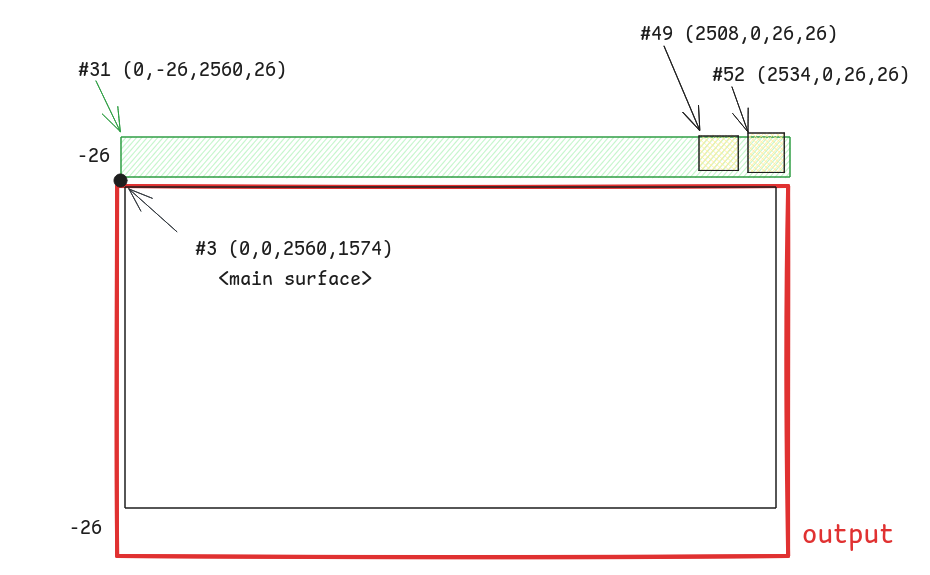
wl_surface#3 是主 surface 具有 toplevel,其下有若干 subsurface
wl_surface#3akaxdg_surface#24,xdg_toplevel#25wl_surface#27akawl_subsurface#28- …
  -> xdg_surface#24.ack_configure(198)              // ack
  -> xdg_toplevel#25.set_min_size(10, 49)
  -> xdg_surface#24.set_window_geometry(0, -26, 2560, 1600)
  -> wl_subsurface#31.set_position(0, -26)
  -> wl_subsurface#34.set_position(0, 0)
  -> wl_subsurface#49.set_position(2508, 0)
  -> wl_subsurface#52.set_position(2534, 0)
Wayland 客户端不知道自己的坐标,但是 subsurface 知道自己在父节点上的相对位置。
  -> wl_shm#4.create_pool(new id wl_shm_pool#54, fd 15, 282624)
  -> wl_shm_pool#54.create_buffer(new id wl_buffer#55, 0, 2560, 26, 10240, 0)
  -> wl_shm_pool#54.create_buffer(new id wl_buffer#56, 266240, 26, 26, 256, 0)
  -> wl_shm_pool#54.create_buffer(new id wl_buffer#57, 272896, 26, 26, 256, 0)
  -> wl_surface#48.attach(wl_buffer#56, 0, 0)
  -> wl_surface#48.damage_buffer(0, 0, 26, 26)
  -> wl_surface#48.commit()
wl_shm_pool_create_buffer(
    pool,           // object
    offset,         // height * stride
    width,
    height,
    stride,         // align + width * bit
    WL_SHM_FORMAT
);
10240 / 2560 = 4,刚好 4 * 8 = 32 对应到 WHM 的颜色格式
| Argument | Value | Description |
|---|---|---|
| argb8888 | 0 | 32-bit ARGB format, [31:0] A:R:G:B 8:8:8:8 little endian |
下面的 26 26 大小需要 256 的 stride,这里涉及到对齐等其他设计 (TODO 为什么前面的就不需要)
所以此处的间隙就是窗口顶部的标题栏,在 Cage 中窗口的位置尽量贴近显示器
// view.c

static void
view_maximize(struct cg_view *view, struct wlr_box *layout_box)
{
	view->lx = layout_box->x;
	view->ly = layout_box->y;

	if (view->scene_tree) {
		wlr_scene_node_set_position(&view->scene_tree->node, view->lx, view->ly);
	}

	view->impl->maximize(view, layout_box->width, layout_box->height);
}
这里的 lx 和 ly 都是窗口在 output-layout 中的绝对坐标,没有考虑到后续窗口自身的 https://wayland.app/protocols/xdg-shell#xdg_surface:request:set_window_geometry
在 tinywl 中,可以看到可能更正常一点的排布(没有主动设置),因为默认自带偏移:
// types/scene/xdg_shell.c

static void scene_xdg_surface_update_position(
		struct wlr_scene_xdg_surface *scene_xdg_surface) {
	struct wlr_xdg_surface *xdg_surface = scene_xdg_surface->xdg_surface;

	wlr_scene_node_set_position(&scene_xdg_surface->surface_tree->node,
		-xdg_surface->geometry.x, -xdg_surface->geometry.y);
wlr_scene 接口没什么能改的,还是 WM 自己看着办吧
// types/scene/wlr_scene.c

void wlr_scene_node_set_position(struct wlr_scene_node *node, int x, int y) {
	if (node->x == x && node->y == y) {
		return;
	}

	node->x = x;
	node->y = y;
	scene_node_update(node, NULL);
}
测试时发现 Treeland 也有这个问题。 https://github.com/linuxdeepin/treeland/issues/744